Blog

Fiber vs. 5G Internet: Reliability Showdown for 2025

fiber internet vs 5G internet

Choosing between 5G home internet and fiber internet can be a tough call for households, remote workers, gamers and small business owners. With so much riding on a stable, high-speed connection—from streaming and video calls to cloud backups and smart home devices—reliability is key. In this post, we’ll break down the pros and cons of 5G internet vs fiber, help you understand how each works, and explain why fiber remains the most reliable option in 2025.

Explore Residential Internet Services

Understanding Fiber Internet

Fiber internet uses strands of glass or plastic to transmit data as pulses of light. This enables incredibly fast and consistent data transmission over long distances with minimal interference.

Benefits of fiber internet:

  • Symmetrical speeds for uploads and downloads
  • Stable performance, even during peak hours
  • Unaffected by weather or physical obstructions
  • Ideal for remote work, 4K streaming, and gaming

Want to know how fast fiber really is? Learn more about fiber internet speeds.

Understanding 5G Home Internet

5G home internet relies on cellular networks to deliver wireless broadband. It uses millimeter wave (mmWave) or sub-6 GHz frequencies, depending on the provider and location.

Pros of 5G home internet:

  • Quick installation with no cables or technicians
  • Expanding coverage, especially in urban and suburban areas

Drawbacks of 5G home internet:

  • Performance varies based on proximity to a cell tower
  • Susceptible to interference from weather and buildings
  • Speeds fluctuate during high network congestion

Curious about fast speeds? Find out if 1000 Mbps is fast enough.

Fiber Internet vs. 5G Home Internet: Key Comparison

Speed

  • Fiber: Offers consistent gigabit-level speeds; excellent for high-bandwidth tasks.
  • 5G: Can reach high speeds, but performance is inconsistent.

Winner: Fiber

Latency

  • Fiber: Ultra-low latency, essential for video conferencing and online gaming.
  • 5G: Lower latency than 4G but still higher and more variable than fiber.

Winner: Fiber

Reliability (weather, congestion, distance)

  • Fiber: Not affected by weather, distance, or network congestion.
  • 5G: Signal can degrade with weather, distance from the tower, or congestion.

Winner: Fiber

Setup and Installation

  • Fiber: Requires infrastructure; may need professional installation.
  • 5G: Typically plug-and-play with minimal setup.

Winner: 5G

Future-Proofing

  • Fiber: Scalable and capable of supporting future internet demands.
  • 5G: Advancing rapidly, but still dependent on cellular infrastructure and local conditions.

Winner: Fiber

Which Is More Reliable for Your Needs?

Choose fiber internet if you:

  • Work remotely and need consistent video call quality
  • Stream in high definition or manage smart home devices
  • Live in a rural area with established fiber infrastructure
  • Run a small business from home and rely on cloud tools

Choose 5G home internet if you:

  • Need a quick and temporary setup
  • Live in a densely populated urban area
  • Don't have access to fiber infrastructure yet

Explore Business Internet Services

Final Verdict: Why Fiber Is the More Reliable Choice

When it comes to 5G vs fiber, 5G offers flexibility and faster setup, but fiber wins the reliability showdown in every other category. Whether you're streaming, working from home, managing a smart household, or running a small business, fiber delivers the speed, stability, and long-term value that modern internet users need.

All West Communications proudly offers fast, dependable fiber internet built to support your needs today and in the future.

Ready for Better Internet?

Check Availability and Get Started

Blog

Fiber vs DSL Internet: Which Is Better?

fiber vs dsl internet

When it comes to internet connections, the choices can feel a little overwhelming. DSL? Fiber? What do these even mean, and which one is best for you? Don’t worry, we’ve got your back! In this guide, we’ll break down the differences between DSL and fiber internet so you can make an informed decision that’s right for your lifestyle or business. Let’s dive in!

What Is DSL Internet?

DSL, short for Digital Subscriber Line, is a type of internet that works through copper phone lines. It’s one of the oldest forms of broadband internet, and chances are, it’s widely available in your area. But what makes DSL tick?

  • Average speeds: Typically range from 1 to 100 Mbps.
  • Availability: DSL is broadly accessible in urban and rural areas alike.

Pros of DSL

  • Affordable, making it great for budget-conscious users.
  • Widely available - even in remote locations.

Cons of DSL

  • Speeds can be slower compared to other options.
  • Not ideal for heavy streaming, gaming, or remote work.

Want to explore your options? Check out All West Residential Internet to see what plans fit your needs.

What Is Fiber Internet?

Fiber internet is the new kid on the block (well, not entirely new, but definitely cutting-edge!). It uses fiber-optic cables that transmit data at the speed of light - literally. So, what makes fiber so special?

  • Average speeds: Often starting at 250 Mbps and going up to 1,000 Mbps (gigabit speed).
  • Consistency: Fiber provides stable and reliable connections, even during peak hours

Pros of Fiber

  • Blazing fast speeds that make streaming, gaming, and remote work seamless.
  • Low latency, meaning less lag time.
  • Highly reliable, even during high-demand periods.

Cons of Fiber

  • May not be available everywhere, sorry, rural folks!
  • Often pricier than DSL.

Curious about how fast fiber can be? Dive deeper into fiber internet speed here.

DSL vs Fiber: Speed, Reliability, and Cost Comparison

Let’s put these two contenders head-to-head. Here’s a quick comparison:

FeatureDSLFiber
Speed1-100 Mbps250-1,000 Mbps
ReliabilityCan be erraticHighly stable
CostBudget-friendlyHigher upfront investment

Whether you need gigabit-level speed or something simpler, All West offers connectivity options to fit your needs.

Which Is Better for You? Fiber vs DSL Based on Use Case

Here’s the real question: which option is right for you? It all depends on how you plan to use the internet.

Choose Fiber If:

  • You’re a heavy streamer or gamer and need blazing-fast speeds.
  • You work from home and rely on stable, low-latency connections.
  • You’ve embraced smart home devices and need a reliable network.

Choose DSL If:

  • You’re a light internet user focused on browsing and email.
  • You’re in a rural area where fiber isn’t available yet.
  • You’re on a tight budget and need affordable plans.

For business-grade solutions, check out All West’s business internet options.

Final Verdict: DSL or Fiber?

Both DSL and fiber have their strengths, and the right choice depends on your unique circumstances. If speed and reliability are top priorities, fiber is the clear winner. But if you’re looking for affordability and accessibility, DSL might be just what you need.

Whatever your choice, All West Communications is here to help. Check availability or compare plans to find the perfect match for your internet needs. Happy browsing!

Blog

Fiber vs Satellite: A Complete Internet Comparison

fiber vs satellite internet

Finding the perfect internet connection can feel overwhelming, especially with options like fiber and satellite vying for your attention. Both are becoming increasingly popular, particularly in rural and underserved areas, but figuring out the best fit for your home or business can be tricky.

Don’t worry - this guide has got you covered! We’ll walk you through the key differences, benefits, and scenarios for both fiber and satellite internet so you can make an informed decision.

What Is Satellite Internet and How Does It Work?

Satellite internet relies on signals from satellites orbiting Earth to your home via a dish. It’s a great option for areas where traditional wired connections aren’t feasible. However, due to the distance the signals must travel, latency (or delay) can be high, making it less appealing for gamers or those relying on video calls. Satellite internet is often the go-to solution for rural homes, cabins, and off-grid locations.

What Is Fiber Internet and How Does It Work?

Fiber optic cables revolutionize internet connections by using light to transmit data at lightning-fast speeds. Fiber internet is known for its reliability, low latency, and ability to handle heavy workloads, whether it’s streaming, gaming, or running multiple connected devices.

While fiber has traditionally been available in urban and suburban areas, its expansion into rural regions by companies like All West Communications is making it increasingly accessible for everyone.

Curious just how fast fiber can go? Check out our guide on “How Fast Is Fiber Internet” to explore real-world speeds and what they mean for your home or business

Satellite Internet vs Fiber: Feature-by-Feature Comparison

Here’s a quick breakdown of the key differences between satellite and fiber internet:

FeatureSatelliteFiber
SpeedUp to 250 Mbps (varies)1,000 Mbps+
LatencyHigh (500+ ms)Low (1–20 ms)
ReliabilityWeather-sensitiveVery reliable
Data LimitsOften cappedUsually, unlimited
AvailabilityWidely availableLimited in rural areas
CostHigher cost per MbpsBetter cost-to-performance

Benefits of Fiber Internet

Fiber internet shines in several areas:

  • Lightning-fast speeds, perfect for streaming, gaming, and remote work.
  • Low latency, ideal for VoIP and Zoom calls.
  • Handles multiple connected devices seamlessly.
  • Reliable regardless of weather or peak usage times.

Whether you're working, streaming, or managing a household full of devices, explore fiber internet options to see what’s available in your area

Benefits of Satellite Internet

Satellite internet is perfect for certain scenarios:

  • Available almost anywhere, even in remote locales.
  • No need for underground wiring or infrastructure.
  • Ideal for backup solutions or off-grid living.
  • Works where other services don’t reach.

Who Should Choose Fiber vs Satellite?

It ultimately comes down to your lifestyle and location. Here’s a quick breakdown:

  • Choose Fiber: If you work from home, stream in 4K, game competitively, or have smart devices spread across your household. If you're running a small business or office in a rural location, consistent speeds and low latency can help you stay productive.
  • Choose Satellite: If you’re in a remote or off-grid area where fiber isn’t available, satellite internet ensures you stay connected.

Final Thoughts: Choosing the Right Connection

Both fiber and satellite internet have their strengths - it’s really about finding what aligns with your needs and circumstances. Fiber excels in speed and reliability, while satellite is unbeatable for availability in the most remote locations. Whichever you choose, All West Communications is here to help you navigate your options and find the perfect fit.

FAQ

Is satellite internet reliable for streaming?

It can work for basic streaming, but buffering and latency are common issues.

Is fiber internet worth the cost?

Yes, especially if you need fast, stable internet for work, entertainment, or gaming.

What’s the biggest downside of satellite internet?

Latency and data caps are its most significant limitations.

Still unsure which option suits you best? Reach out to All West Communications to discuss your internet needs and discover the possibilities!

Blog

How to Choose the Right Router for Your Home

how to choose the right router

Routers are the gateway to the internet and are essential for a reliable, secure, and fast connection. Whether you’re streaming your favorite show, joining a video conference, or gaming with friends, the right router ensures your experience is seamless.

This guide will walk you through everything you need to know about how to choose a router that meets your needs. Whether you're upgrading or buying your first router, this wireless router buying guide is here to help.

What is a router?

The router is a piece of equipment that takes the signal from your modem and distributes it to both wired devices and wireless (wi-fi) devices. The router also controls the range in which you can receive a wireless signal.

The first step in selecting a router is making sure it can handle the speed of your internet plan. Not all routers can handle all internet speeds. If your internet plan has 300 Mbps and your router can only handle 100 Mbps, you will be missing out on 200 Mbps of speed. (What internet speed is right for you?)

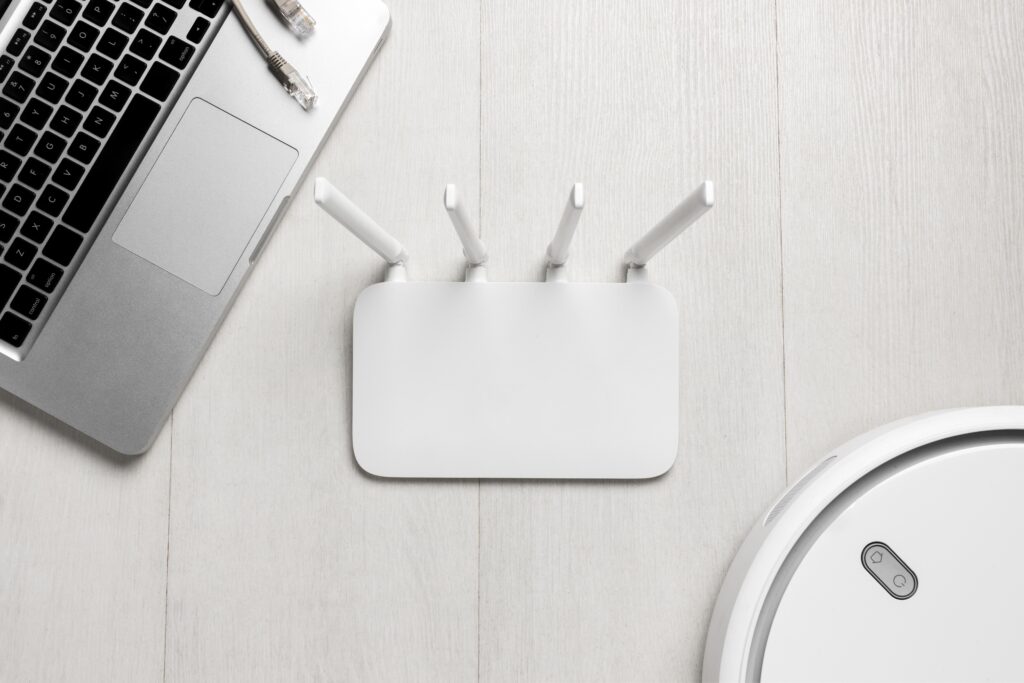
A sleek white Wi-Fi router with four antennas is placed next to a silver laptop and a robotic vacuum cleaner on a light wooden surface. This image visually complements **The Ultimate Guide On How To Choose The Right Router For You**, emphasizing modern connectivity solutions for smart homes.

Understand Your Internet Needs

First things first: consider your internet usage. Are you a casual browser, a remote worker, a gamer, or managing a smart home? Your answer will determine the speed, range, and features your router should have.

 Common Use Cases

  • Casual browsing and email
    • Activities like checking email, reading the news, or scrolling through social media require minimal bandwidth, making them easy to handle on almost any internet plan.
  • Streaming HD or 4K content
    • Watching your favorite shows or movies in high definition—or even stunning 4K—demands a stable, high-speed connection to avoid buffering and enjoy smooth playback.
  • Online gaming
    • Whether you're playing competitively or casually, online gaming relies on low latency and fast upload/download speeds for responsive, lag-free gameplay.
  • Multiple connected smart devices
    • From security cameras to smart speakers and thermostats, a smart home needs a reliable connection that can support many devices running at the same time.

Learn more about our residential internet plans.

Key Features to Look For in a Router

Modern routers come with a variety of features. Let’s break down what’s important

Dual-Band or Tri-Band?

  • Dual-band routers offer 2.4 GHz and 5 GHz bands.
    • Dual-band routers provide two frequency options—2.4 GHz for broader coverage and 5 GHz for faster speeds—giving you flexibility based on your needs.
  • Tri-band routers add an extra 5 GHz band to reduce congestion.
    • Tri-band routers take it a step further by adding a second 5 GHz band, which helps reduce network congestion and improve performance for multiple connected devices.

Wi-Fi Standards

  • Wi-Fi 5 (802.11ac) is common.
    • Wi-Fi 5 (802.11ac) is the standard found in many homes today, offering solid speed and performance for everyday use.
  • Wi-Fi 6 (802.11ax) is faster and supports more devices.
    • Wi-Fi 6 (802.11ax) is the next-generation upgrade—delivering faster speeds, better efficiency, and the ability to handle more devices at once, making it ideal for smart homes and busy networks.

Coverage Area

Make sure your router provides strong, reliable coverage in every part of your home—including basements, upper floors, or outdoor areas. For larger homes or spaces with thick walls, a mesh Wi-Fi system can eliminate dead zones by using multiple access points to blanket your entire space with consistent signal strength. Determine the best place to put your WiFi router.

Security Features to Consider

Security is essential when it comes to protecting your personal data and keeping your home network safe from unauthorized access. When choosing a router, look for advanced features like:

  • WPA3 encryption - offers stronger protection than older standards
  • Built-in firewalls - help block malicious traffic
  • Guest network access - allows visitors to connect without exposing your main devices or sensitive information.

These features add critical layers of defense to keep your internet experience safe and secure.

Want a router that checks off all of these boxes and more? All West trusts the Plume SuperPod system for all your router needs. Plume is a cloud-based system that provides you with full-strength, uninterrupted connectivity where and when you need it.

The Plume app delivers an enhanced experience through custom guest access, parental controls, and AI Security™ for added protection. SuperPods™ are beautiful, small and plug straight into the wall.

Conclusion

Choosing a router doesn’t have to be overwhelming. Consider your household’s usage, the size of your space, and whether you want cutting-edge features. With the right router and internet bundle, you can enjoy strong, stable Wi-Fi for years to come.

If you need help selecting a router or want to learn more about Plume, our Customer Service team is just a phone call away at 866.255.9378.

Blog

How to Switch Internet Providers the Right Way

An abstract digital illustration featuring a large, glowing Wi-Fi symbol over a network grid, symbolizing the concept of testing ping and data connection speed.

Are you tired of slow internet speeds, sudden price hikes, or unreliable connections? Switching internet providers doesn’t have to be a hassle. With a little planning and the right approach, you can easily transition to a better service that fits your needs. In this guide, we’ll walk you through the why, what, and how of switching ISPs, so you can enjoy a seamless upgrade without losing connectivity.

Why People Switch Internet Providers

Let’s face it - your internet should work for you, not against you. Here are some common reasons people start looking for a new provider:

  • Price increases: Surprise charges or rising bills are frustrating.
  • Slow or unreliable service: Buffering during movie night? That’s a no-go.
  • Better offers: Sometimes, the grass really is greener on the other side.
  • Upgrading for remote work: Faster speeds help you stay productive.

If any of this sounds familiar, it might be time to explore your options.

Ask These Questions Before You Switch

Before diving into a new contract, it’s important to get the details right. Here are a few questions to ask potential providers:

  • Do they offer a trial or satisfaction guarantee?
  • What’s included in the installation? Will there be additional fees?
  • Is 24/7 customer support available?
  • Are there regional limitations or speed drops during peak hours?

Step-by-Step Guide to Canceling Your Internet Service

Switching ISPs requires some planning to avoid unexpected fees or service gaps. Follow these steps to wrap up with your current provider:

Step 1: Check for Early Termination Fees

Review your current contract to determine if breaking it early will cost you. Some providers charge hefty fees, so it’s worth checking before making a move.

Step 2: Review Agreement Details

Look at the fine print regarding contract length, notice periods, and equipment return policies. It’s also smart to confirm the cancellation process - some companies require a call or in-person visit.

Step 3: Understand Pro-Rated Billing

Ask your provider how final charges will be calculated. Some companies will prorate your bill based on the exact cancellation date, while others might charge for the full month.

Step 4: Plan Around Your Billing Cycle

Avoid paying for extra days of service by scheduling your cancellation date to align with your billing cycle. Timing is everything!

Evaluate Your Internet Needs

Before you commit to a new plan, think about how you use the internet:

  • Do you stream 4K content, game online, or participate in video calls?
  • Are you running a smart home with connected devices?
  • Do you need symmetrical upload and download speeds?

These questions can help you choose a plan that matches your lifestyle.

Compare Internet Types and Providers

Fiber vs Cable vs DSL

Not all the internet is created equal. Fiber internet is lightning-fast and future-proof, making it a popular option. Cable and DSL have their pros and cons, but might not offer the same reliability or speed.

Speed and Reliability Differences

Make sure you understand Mbps, latency, and data caps. Throttling during peak hours can also impact your experience. Look for a provider who’s transparent about what they can deliver.

Consider Equipment Compatibility

Switching providers might mean upgrading your equipment. Here’s what to keep in mind:

  • Will your current modem or router work with the new provider?
  • Are there rental fees for new devices?
  • What are the installation requirements?

Tips to Avoid Downtime During the Switch

The last thing you want is to be stuck without internet. Here’s how to keep the transition smooth:

  • Schedule and confirm your new service installation before canceling your old one.
  • Coordinate dates carefully to avoid overlapping charges.

Conclusion

Switching internet providers doesn’t have to be a headache. By doing a little research and asking the right questions, you can find a service that meets your needs without any surprises. Whether you’re looking for faster speeds, better reliability, or more competitive pricing, making the move to All West’s fiber internet could be your smartest decision yet. Ready to upgrade? Browse our plans or talk to one of our experts today!

Blog

How to Get High-Speed Internet in Rural Areas

An aerial shot of a vast rural landscape with green fields and small patches of water. The area is divided by dirt roads and surrounded by various farmlands, emphasizing the rural setting's connectivity challenges. Keywords: how to get internet in rural areas.

In today's digital age, having a reliable and fast internet connection is crucial for everything from education and work to communication and entertainment. Yet, for many individuals living in rural areas, securing a stable internet connection presents unique challenges.

If you're wondering how to get internet in rural areas, you're in the right place. This comprehensive guide aims to provide actionable, clear, and concise information to help you navigate the myriad of options available.

Understand Your Internet Needs

Before diving into the specifics, it's essential to understand your internet needs when learning how to get internet in rural areas. Different activities require different bandwidths:

  • Basic Browsing and Email: 1-5 Mbps
  • Streaming Videos (Standard Definition): 3-4 Mbps
  • Streaming HD Videos or Online Gaming: 5-25 Mbps
  • Video Conferencing or Remote Work: 10-50 Mbps

By pinpointing your specific needs, you can make more informed decisions on the internet speed that’s right for you

 A young man sits on a wooden bench outdoors, using a laptop with a focused expression. He is surrounded by a lush green landscape with mountains in the background, depicting the challenge of getting reliable internet in remote areas. Keywords: how to get internet in rural areas.

Best Internet Options for Rural Areas


1. Satellite Internet

Satellite internet is one of the most widely available solutions for rural residents.

  • Pros: Coverage in even the most remote locations, relatively easy installation.
  • Cons: Latency issues, higher costs, data caps.

Speed range:

  • 20 - 250 Mbps download
  • 3 - 20 Mbps upload

If you're a rural business owner needing more robust service, you can also learn about rural business internet options for satellite and beyond.


2. Fixed Wireless Internet

Fixed wireless internet uses radio signals to provide internet service, typically through a line-of-sight connection to a tower. Speeds generally range from 12 - 50 Mbps.

  • Pros: Lower latency compared to satellite, good speeds.
  • Cons: Requires a clear line of sight, limited to certain areas.

Speed range:

  • 10 - 100 Mbps download
  • 5 - 50 Mbps upload


3. Mobile Broadband

Utilizing 4G and increasingly 5G networks, mobile broadband can be a viable option. Speeds typically range from 5 - 50 Mbps, depending on the provider and location.

  • Pros: Mobility, ease of installation, no need for a fixed line.
  • Cons: Limited data plans, variable speeds depending on network congestion and coverage.

Speed range:

  • 5 - 150 Mbps download
  • 1 - 35 Mbps upload


4. DSL (Digital Subscriber Line)

DSL uses existing telephone lines to provide internet service.

  • Pros: Relatively stable connection, reasonably priced, often available in semi-rural areas.
  • Cons: Slower speeds compared to cable or fiber, speed decreases with distance from the provider's central office.

Speed range:

  • 1 - 100 Mbps download
  • 0.5 - 10 Mbps upload


5. Community Networks

Local initiatives where communities pool resources to build and operate their own broadband networks.

  • Pros: Tailored solution for specific community needs, potential for high speeds.
  • Cons: Requires local initiative and investment, varied performance and support.

Speed range:

  • 10 - 1,000+ Mbps (1 Gbps) download
  • 10 - 1,000 Mbps upload
An expansive aerial view of a rural village with a long, straight road running through the center. The landscape is marked by agricultural fields and scattered houses, showing a community's isolation and the potential difficulty of securing internet access. Keywords: how to get internet in rural areas.

How to Boost Internet Speeds in Rural Areas

Here are several strategies to improve internet speeds in rural regions:

  1. Enhanced Equipment: Investing in a high-gain antenna or a more powerful router can amplify signals and improve connectivity.
  2. Signal Boosters: Installing signal boosters can enhance mobile broadband and fixed wireless signals, making for more stable and faster internet.
  3. Data Optimization Tools: Using software to manage and optimize data usage can help make the most of available bandwidth.
  4. Wired Connections: Whenever feasible, using wired connections (Ethernet) instead of Wi-Fi can lead to more reliable and faster internet speeds.
  5. Subscription Plans: Working with your provider to adjust your subscription plan, including opting for higher-speed plans if available, can significantly improve your internet experience.

What If You Still Can’t Get Reliable Internet?

For regions with particularly poor connectivity, we recommend the following steps.

Run a Local Feasibility Check

Assess the available options, coverage maps, and consult with local providers to understand your starting point.

Collaborate with Your Community

Work with community leaders and local governments to explore public-private partnerships that could enhance internet infrastructure in the area.

Satellite Internet as a Backup

Given its extensive coverage, satellite internet can be a primary or supplementary method to ensure some level of connectivity.

Use Mobile Networks Strategically

Place emphasis on mobile broadband where traditional ISPs fall short. Analyze the best carrier in your region for the best performance.

Explore Government Grants

Look for government grants and subsidies designed to enhance internet access in rural communities, such as those provided under the FCC's Rural Digital Opportunity Fund (RDOF).

Frequently Asked Questions

What are the best internet options in rural areas?

Some of the best internet options in rural areas include satellite internet, fixed wireless internet, mobile broadband, DSL and local community networks.

What’s the best choice for remote farms or cabins?

Satellite internet may be the best choice for remote farms or cabins, depending on proximity to alternative network options.

Can the weather affect satellite internet?

Yes, adverse weather conditions can impact satellite internet performance.

Conclusion

By considering these options and recommendations, individuals and communities in rural areas can significantly enhance their internet connectivity, making it more reliable and faster.

If you have any further questions or need tailored advice, feel free to reach out for more personalized guidance or see available plans from a provider who understands rural internet challenges

Securing a reliable and fast internet connection in rural areas can indeed be challenging, but it's far from impossible. Whether you opt for satellite, fixed wireless, mobile broadband, DSL, or even a community network, understanding your specific needs and the pros and cons of each option will help you make the best choice. By leveraging the available resources and technologies, you can enjoy a solid internet connection that enhances your lifestyle, work, and entertainment.

For those pondering how to get internet in rural areas, consider this guide your blueprint for making an informed decision that ensures seamless connectivity.

Blog

How to Watch TV Without Cable: Cut the Cord

A man sitting on a couch watching a sports match on a TV screen, illuminated by colorful ambient lighting. This setup shows "how to stream TV without cable," highlighting streaming live sports events through online services.

Why So Many Are Choosing to Watch TV Without Cable

In today's digital age, traditional cable TV is steadily losing its stronghold in our living rooms. For anyone looking to cut the cable and dive into the world of streaming—this is your comprehensive guide on how to stream TV without cable. Whether you're curious about alternatives to cable TV, pondering “how to stream TV without cable,” or questioning “how do you stream local channels,” this article addresses all your concerns.

What is Streaming TV?

Streaming TV refers to the method of watching television shows, movies, and even live broadcasts over the internet instead of through traditional cable or satellite services. Many people are making the switch, seeking alternatives to cable TV that offer flexibility, diverse content, and, often, significant savings.

Who Can Benefit from Streaming TV?

Anyone who currently subscribes to cable TV or is considering a new television service can benefit from streaming. It caters to a wide demographic:

  • College Students: Save money and stream on devices you already own.
  • Families: Customize subscriptions for kids, sports and more.
  • Seniors: Tech-friendly streaming platforms now make it easier than ever to switch.

If you have a reliable internet connection and a device to stream on, streaming TV is an appealing option for you.

A couple sitting on a couch watching a vibrant street scene on a smart TV. This image represents "how to stream TV without cable," demonstrating the use of smart TVs for accessing online streaming content.

When is the Best Time to Cut the Cord?

It’s smart to switch to streaming when:

  • Your current cable contract is about to expire
  • Your bill keeps increasing without added value
  • You mostly watch on-demand shows anyway

Where Can You Watch TV Without Cable?

Streaming can be done almost anywhere:

  • At home on a smart TV
  • On the go with your phone or tablet
  • While traveling with a laptop or streaming stick

Need reliable internet for seamless streaming? Explore All West internet plans.

Why Streaming TV is a Better Alternative to Cable

  • Cost Savings: Cable bills can reach exorbitant levels with added fees for hardware and premium channels. Streaming services typically operate on a flat monthly rate, often far cheaper.
  • Content Variety: With streaming services, you can access a broader range of content tailored to your interests.
  • On-Demand Viewing: Unlike cable TV, streaming services let you watch shows and movies anytime, fitting into your schedule.
  • Flexibility: Most streaming services don’t lock you into long-term contracts, allowing you to cancel or switch services anytime.

How to Stream TV Without Cable?

To start streaming TV without cable, follow these steps:

Assess Your Internet Connection

A stable, high-speed internet connection is crucial. Most services recommend at least 5-10 Mbps for HD streaming and higher for 4K content.

Choose Your Streaming Device

Several devices can facilitate streaming, including smart TVs, smartphones, tablets, gaming consoles (PS5, Xbox), and dedicated streaming devices like Roku, Apple TV, or Amazon Fire Stick.

Select Streaming Services

There are numerous streaming platforms available. Here are some key categories and their popular services:

  • On-Demand Streaming: Netflix, Hulu, Amazon Prime Video
  • Live TV Streaming: Sling TV, YouTube TV, Hulu + Live TV
  • Niche Content: Disney+, ESPN+, HBO Max

How to Stream Local Channels Without Cable

Local channels like ABC, NBC, CBS, and Fox are critical for many viewers. Here's how you can stream them:

Use a Live TV Streaming Services:

Many live TV services offer local channels as part of their packages, allowing you to stream news, sports, and network shows without a traditional cable subscription. Simply sign up with a provider and enter your ZIP code to confirm local channel availability. Most services work on smart TVs, streaming devices, or mobile apps, making it easy to watch your favorite local programming from anywhere.

Try Network Apps or Websites

Individual network apps or websites sometimes offer live streaming, allowing you to watch local channels without cable. Networks like ABC, NBC, CBS, and FOX often let you stream live content through their apps or websites when you sign in with a participating TV provider. In some areas, you may even be able to watch live broadcasts for free, or access recently aired episodes on demand without logging in.

Use a Digital Antenna

If your streaming service doesn’t include local channels, a digital antenna is a great solution. It allows you to access free over-the-air broadcasts from major networks in your area. For a deeper dive into how antennas work and other ways to watch TV for free, check out our guide to free cable TV.

A person sitting in a dark room with a telescope in the background, playing a space-themed video game on a TV screen. This image illustrates "how to stream TV without cable," showcasing alternative entertainment options like gaming through streaming platforms.

Frequently Asked Questions (FAQs)

What are the potential costs of streaming TV without cable?

The cost of streaming TV can vary widely depending on your preferences and the services you choose. Here’s a breakdown of potential costs:

  • Internet Service: $50 to $100 per month, depending on the speed and provider.
  • Streaming Subscriptions: Costs can add up based on the number of services you subscribe to. Here are some common price points (as of 2023):
    • Netflix: $9.99 to $19.99 per month
    • Hulu: $6.99 to $12.99 per month (with ads vs. without ads)
    • Disney+: $7.99 per month
    • Amazon Prime Video: $8.99 per month or included with Amazon Prime membership at $119/year
    • HBO Max: $14.99 per month
    • Live TV Streaming Services (optional): Services like Sling TV, YouTube TV, and Hulu + Live TV range from $30 to $70 per month.

Total Estimated Monthly Cost:
On average, if you subscribe to 3-4 streaming services, you might spend between $50 to $80 plus the cost of your internet connection.

Best Cable TV Alternatives to Watch TV Cheap or Free

To streamline your streaming experience, you’ll need a few essential pieces of equipment and software:

  • Smart TV: A smart TV with built-in apps can simplify the process. Brands like Samsung, LG, and Sony come preloaded with popular streaming apps.
  • Internet Router and Modem: Ensure you have a reliable router and modem to provide a stable internet connection.
  • Mobile Devices (optional): Smartphones, tablets, and laptops can also be used for streaming via dedicated apps.
  • HDMI Cable: Needed to connect streaming devices to your TV.
  • Streaming Subscriptions: Software-wise, you’ll need to install apps for each streaming service you subscribe to (Netflix, Hulu, Disney+, etc.).
  • Streaming Device: For non-smart TVs, consider devices such as:
    • Roku
    • Amazon Fire Stick
    • Apple TV
    • Google Chromecast

Final Thoughts

Cutting the cord can save you money, and there are many affordable alternatives to traditional cable. Here are a few that offer great value:

  • Roku Channel: Free streaming service offering movies, TV shows, and live channels.
  • Pluto TV: Offers over 250 channels and thousands of on-demand movies and TV shows for free.
  • Tubi TV: A free service with a large library of movies and TV shows.
  • Sling TV: Offers live TV streaming starting from $30 per month, which is cheaper than most traditional cable packages.
  • Philo: Provides 60+ live TV channels for $25 per month.
  • Peacock TV: NBC’s streaming service with a free tier and premium options starting at $4.99 per month.
  • Paramount+: Offers a basic plan for $4.99 per month.

Learning how to stream TV without cable offers a modern, economical, and versatile way to enjoy television. From substantial cost savings to an on-demand library of content, the benefits are clear. With a stable internet connection, the right devices, and a selection of streaming services, you can unlock a new era of television viewing. Whether you aim to cut the cable fully or supplement your current viewing habits, knowing how to stream TV without cable is the first step toward television freedom.

Ready to make the switch? Check out All West TV Streaming options.
Blog

How Many Devices Can 1 Gigabit Internet Support?

How Many Devices Can 1 Gigabit Internet Support | All West

When you think about the internet, most people want fast speeds that can handle lots of tasks at once. But just how many devices can run smoothly on a 1-gigabit internet plan? Whether you’re streaming movies, playing games, or using smart home gadgets, knowing how much bandwidth you have matters.

A 1-gigabit plan (that’s 1,000 Mbps) is like the ultimate setup for today’s homes, giving you fast speeds perfect for streaming, gaming, remote work, and more. Let’s break down how it works, how many devices can use it, and tips to keep your network running smoothly.

What is 1-Gig Internet & Why is It Popular?

A 1-gigabit internet plan gives you download and upload speeds of up to 1,000 Mbps, this is made possible by light pulses through fiber optic cables. Compared to older internet types like DSL or cable, gigabit internet is way faster and more reliable. Here’s why it’s a favorite:

  • Super-fast speeds: Perfect for streaming in 4K, online gaming, and video calls without interruptions.
  • Handles multiple devices: Great for families with lots of phones, tablets, and smart tech running at the same time.
  • Low latency: Important for gaming and apps that need instant response times.

How Many Devices Can 1 Gigabit Internet Support?

It depends on what your devices are doing. Gigabit internet gives you 1,000 Mbps, which is shared among all connected gadgets. Here’s a simple look at how much bandwidth common devices use:

Device Type & Bandwidth Usage Estimates

Device TypeBandwidth Usage Overview
Streaming (4K Netflix, YouTube, etc.)25-50 Mbps per stream
Gaming (Xbox, PlayStation, PC, etc.)10-50 Mbps per session
Video Calls (Zoom, Teams, etc.)3-10 Mbps per call
Smart Home Devices (Thermostats, Security Cameras, etc.)1-5 Mbps per device
Web Browsing & Social Media1-5 Mbps per device

For example, let’s say your family is streaming three 4K movies, gaming online, and doing a video call at the same time. That would use about 140-200 Mbps, leaving plenty of room for other things like smart home devices, too. 

As you get closer to using your plan’s bandwidth limit, things can start to slow down. This happens because devices and tasks are all competing for the same bandwidth, especially during busy times when everyone in the house is online. Increasing your bandwidth to at least 1 gig helps keep your home running smoothly.

Can 1-Gig Internet Handle a Smart Home?

Definitely! Gigabit internet works great for smart homes because it can handle cameras, streaming devices, and automation tools all at once. If your house is big or has thick walls, try upgrading to a mesh network or a WiFi 6 router for better coverage. With 1-Gig speeds, you’ll have plenty of bandwidth to support multiple users and devices without lag. It’s a reliable solution for homes that rely on constant connectivity and automation.

Factors That Affect Gigabit Internet Performance

Even though gigabit speeds are fast, some things can slow them down. Here are the key points:

WiFi vs. Ethernet - Which is Faster?

Ethernet cables give you full gigabit speed. WiFi might be slower because of interference or distance from the router. Using a WiFi 6 router can help fix this problem and handle lots of devices at once.

Router & Network Equipment Limitations

Old routers and modems can limit your speeds. Upgrading your equipment is important to get the most from your gigabit plan.

Tips to Optimize Your Gigabit Internet for Multiple Devices

Want to make the most of your gigabit connection? Here are some tips:

  • Use a high-performance router (WiFi 6 or mesh network).
  • Set up guest networks to separate home and visitor traffic.
  • Enable Quality of Service (QoS) settings to prioritize certain devices.
  • Use Ethernet for critical devices like gaming consoles and work PCs.

Conclusion

A 1-gigabit internet plan can easily support more than 20 devices running at the same time. If you’re into streaming, gaming, or smart home technology, gigabit speeds make everything run smoothly without lag or buffering.

Ready to upgrade your connection? Check out All West’s fiber internet plans for reliable gigabit speeds designed for your needs.

FAQ

Is 1-Gig Internet Enough for a Family of 4 or More?

Yes, 1-gig speeds can support 20+ devices at once if properly managed.

Will a 1-Gig Connection Improve Gaming & Streaming?

Yes, low latency and high speeds help reduce lag and buffering.

Do I Need a Special Router for 1-Gig Internet?

Older routers may cap speeds at 500 Mbps or less - consider upgrading to a WiFi 6 or mesh system.

Blog

Switching to Fiber Internet? Here’s What to Expect

fiber internet

If you’ve ever wondered about switching to fiber internet, you’re not alone. More and more people are making the switch, drawn by promises of faster speeds, greater reliability, and future-proof connectivity.

But what happens during the installation process, and why is fiber internet better than traditional broadband options? This blog dives into the details, so you’ll know exactly what to expect when upgrading to high-speed fiber internet.

What Is Fiber Internet and Why Is It Better

Fiber internet uses ultra-thin strands of glass or plastic to transmit data at the speed of light. Unlike traditional broadband methods like cable, DSL, or satellite, fiber offers unparalleled speed and reliability. Here are some key benefits:

  • Faster speeds: Fiber internet provides symmetrical speeds, meaning upload and download speeds are equally fast.
  • Greater reliability: Fiber doesn’t slow down during peak hours or due to weather-related issues.
  • Lower latency: Say goodbye to lag during video calls, gaming, and streaming.
  • Future-proof technology: Fiber networks are designed to handle higher demands as technology evolves.

For users dealing with inconsistent internet and slow connections, fiber is a game-changer.

How Does Fiber Internet Installation Work?

Pre-Installation Preparation

Before the installation, All West Communications will check if service is available in your area. If fiber isn't yet available, you can join a waitlist for updates on expansion plans. As your installation date approaches, our team will get the required permits from your city, plan the route for fiber from the nearest connection point on your property, and then place the conduit and fiber that will service your home.

Here’s a step-by-step breakdown of the pre-install work that takes place at your property:

  • Laying the fiber-optic cables: If fiber infrastructure isn’t already in place, cables will be installed near your home or business either by underground conduit or hung on aerial utility poles near your property.
  • Setting Up the Optical Network Terminal (ONT): This device connects the fiber network to your home’s internet system.

Installation Day - What Happens?

Here is a detailed guide on the installation process within your residence:

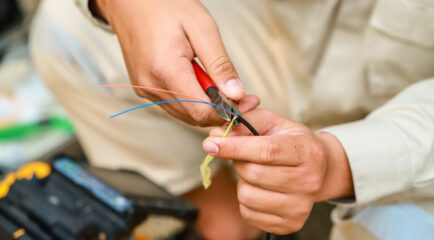
  • Connecting the router/modem to the ONT: The technician will verify the compatibility of your router with the fiber connection, splice your dedicated fiber strands into the network, and complete the setup. Fiber splicing involves carefully melting and joining the glass threads to create a continuous cable extending back to our data center, ensuring reliable and high-speed internet connectivity.

Typically, the installation process takes just a few hours to ensure everything is working flawlessly.

Post-Installation – What to Expect?

Once installed, your fiber internet connection will be tested for speed and reliability. Most users notice immediate improvements, including faster downloads, smoother video calls, and lag-free gaming. If any issues arise, All West Communications provides excellent customer support to troubleshoot and resolve them quickly.

If you have issues with your connection or want to make a claim for damaged property, contact our support team as soon as possible to start a trouble ticket.

How Fiber Internet Compares to Other Internet Types

Fiber vs. Cable Internet

Cable internet relies on shared bandwidth, which can slow down during peak usage times. Fiber, on the other hand, delivers consistent speeds regardless of how many users are online. Plus, fiber’s symmetrical speeds make it ideal for uploading large files and streaming content in high definition.

Fiber vs. DSL & Satellite Internet

DSL and satellite connections often suffer from high latency, making them unreliable for gaming, video conferencing, and streaming. Fiber internet eliminates these issues, offering a seamless experience. It’s also a better long-term investment, as older technologies struggle to keep up with modern demands.

Why Should You Switch to Fiber Internet?

There are plenty of reasons to upgrade to fiber internet, especially with All West Communications:

  • Work from home: Fiber ensures smooth video calls and fast access to cloud-based tools.
  • Streaming & gaming: Enjoy uninterrupted entertainment with minimal buffering and low latency.
  • Smart home compatibility: Fiber supports interconnected devices like security systems, smart thermostats, and voice assistants.
  • Future-proofing: Fiber networks are built to handle the evolving needs of tech-savvy households.

How to Switch to Fiber Internet in Your Area

Switching is easier than you might think. Start by checking fiber availability in your area through All West Communications. Consider adding TV and home phone services, then schedule your installation. If fiber isn’t available yet, stay connected with All West to learn about upcoming expansions.

Conclusion

Switching to fiber internet offers incredible benefits, from faster speeds to unmatched reliability. With All West Communications, the installation process is straightforward, and the end result is a connection that transforms your digital experience. Don’t wait — check availability in your area and take the first step toward better internet today!

FAQ

  • How long does fiber internet installation take?
    • Installation inside your home usually takes just a couple of hours, but timing may vary depending on your location.
  • Do I need a new router for fiber internet?
    • Some older routers may not support fiber speeds. All West Communications can recommend options to maximize your connection.
  • What happens if fiber isn’t available in my area yet?
    • You can join All West’s waitlist or inquire about future deployment plans.

Blog

Everything You Need to Know About the Plume HomePass App Update

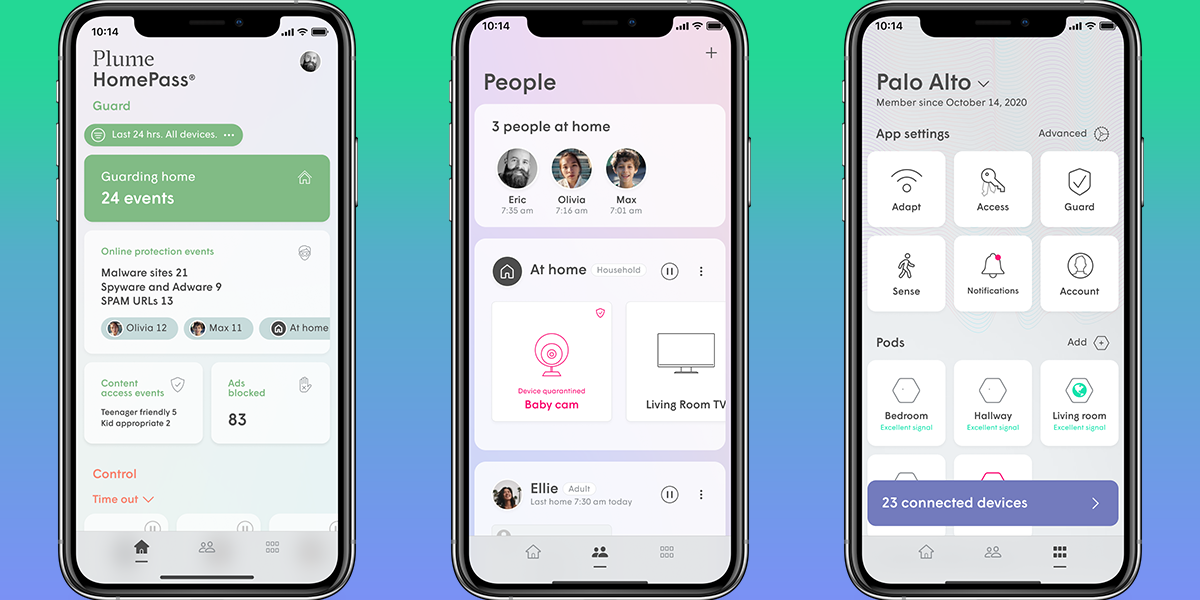
Plume HomePass has a new look! In March, Plume released a new update for their HomePass app. HomePass allows you to easily set up and manage your Wi-Fi network, all from your phone. You’re able to set internet freezes, use existing devices as motion sensors, create guest passwords, and more. This update allows customers the ability to experience a new, refreshed look on the mobile app. Plume’s goal for the update is to help enhance the Plume SuperPods and HomePass experience.

Here's what changed:

  1. Persistent Bottom Navigation Bar

To help make finding data easier, HomePass now has a bottom navigation bar. This navigation bar is accessible from every screen, so you are able to go from one section of the app to the next. The sections you’re able to choose between on the navigation bar are the home screen, the people section and the more menu.

app-device-home-guard_1
  1. Customizable Home Screen Sections

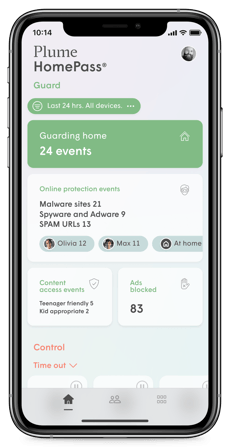
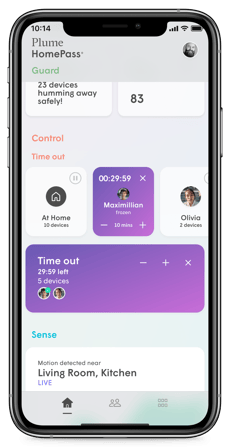
You are now able to customize your HomePass app home screen to show what you need it to. You can arrange Guard, Control, Sense and Adapt sections to be in a different order or hide it completely. You’re able to view details specific to each section right on the home screen. In the Guard section, you’re able to view guard, online protection and content access events, as well as any blocked ads. Control lets you view and set any person or device time-outs. Sense shows you a live motion view of your home, while the Adapt section displays your current pods and auto-speed test results. By being able to personalize your home screen, you can easily adjust HomePass to fit your needs.

app-device-home-control
  1. People Section

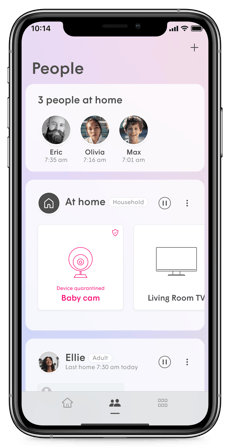
The “People” section is the middle icon on the bottom navigation bar. This is where profiles and devices are organized. This section included features that relate to people and devices on the network. When a primary device assigned to a person connects to your home network, their profile will appear in the “people at home” module. The new “At Home” module displays devices that aren’t assigned to a specific profile but are connected to your network. You’re able to make profiles and assign devices to specific profiles in People. Each profile has customizable settings, or you can choose between the default adult, teen, kid or household options. Another new feature in this section is the ability to invite people to the HomePass app – a feature good for anyone who needs read-only or admin access to the app.

app-device-people
  1. The More Menu

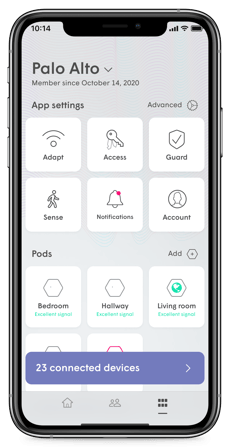
The last section of the app’s updated layout is the more menu. This section is where you can change settings for everything that is available to you. App settings for Adapt, Control, Guard and Sense, along with notifications and your account are at the top of the menu. If you can’t find a specific setting you want to change on the home screen or people section, it can be found in the more menu. You can also check your pod’s health and current status. If you need assistance with your Plume pods or navigating the HomePass app, the support module allows you to contact us quickly and easily.

app-device-more

HomePass 1.0 is being discontinued on April 30, 2022. If you don’t have automatic app updates enabled, make sure to visit your device’s app store to update Plume HomePass. While we don’t control the app updates, we hope the new layout allows you to better control your home’s Wi-Fi network. If you have any questions about navigating the updated HomePass app, visit our Residential How-To page for step-by-step instructions, download the HomePass guide or give our Customer Care team a call at 866.522.9378. Our team is ready to help Monday – Friday, 8:30 AM – 9:30 PM, and Saturday (phone support only), 8:30 AM – 5:30 PM.

Learn more about Plume at https://www.allwest.com/residential/internet/.

Related Articles